A builder that respects the people on both sides of it.
Operations teams get a canvas and ready-made components. Engineers get real TypeScript in Git. Leaders get permissions, audit, and a deployment they control. Same app, no compromise.
A visual builder on a 12-column canvas.
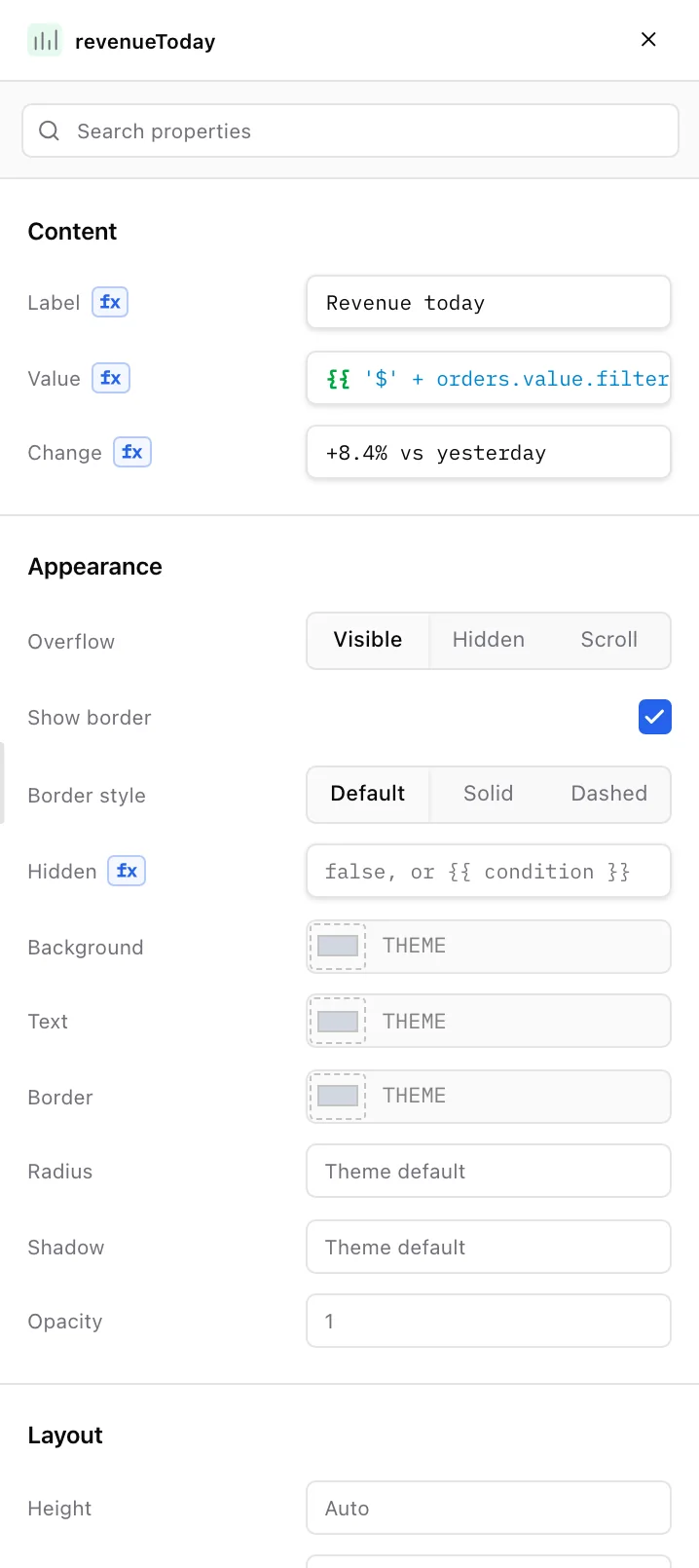
Place components, resize them, nest them in containers, tabs, and modals. The inspector shows every prop, every binding, and every event, so nothing is hidden in a menu three levels deep.
132 components
Tables with sticky headers and inline editing. Seven chart types. Forms with validation, calendars, file inputs, PDF and video viewers, signature pads, and QR codes.
Bindings with autocomplete
Reference query results and component state with double-curly expressions. Autocomplete suggests the names you see on the canvas.
Events and actions
Run a query, open a modal, set a variable, navigate, notify, download, or run a script. Chain them on success and failure.
Reusable components
Turn a pattern into a component with inputs and events, then use it across apps. Update it once.
Pages, shells, and navigation
Multi-page apps with a shared header, sidebar, URL parameters, and per-page state.
An AI builder that shows its work.
Describe what you need. The builder reads the component registry and your current page, then adds components and wires queries. It captures the rendered result so you can check it before anything is saved.
Structured edits, not guesses
The builder uses typed tools to add, move, and bind components. Every change is validated before it is applied.
Approval where it matters
Removing components or granting a data source asks you first. Query runs against real data are always explicit.
Undo, including the AI’s own changes
Document edits are reversible within a run. You stay in control of the page.
Bring your own model
Connect an Anthropic-compatible or OpenAI-compatible provider. Keys stay on your server.
Add a table of open orders with customer, total, and status. Put a refund button next to it that asks for confirmation.
Added a table bound to the open orders query with four columns, and a Refund button that opens a confirmation modal before running the refund query.
- Added Table: ordersTable (12 columns wide)
- Bound rows to getOpenOrders.data.items
- Added Button: refundButton with confirm modal
- Captured page and checked the render
Connect the data you already have.
Resources are server-side connections with encrypted credentials. Apps ask for access; the server decides. The browser never sees a secret.
| Source | What you can do |
|---|---|
| REST API | Any HTTP endpoint with methods, headers, params, bodies, retries, and response handling. |
| MySQL and Trino | Raw SQL with inline bindings, SSL, IAM auth on RDS, and SSH tunnels. |
| gRPC | Typed service calls with metadata and JSON payloads. |
| Amazon S3 | Browse buckets while configuring, then list, get, put, and delete from queries. |
| JavaScript | Server-side scripts that call resources and other queries, with pinned libraries. |
Authentication that matches your stack
Basic, Bearer, API keys, OAuth 2 client credentials, AWS Signature V4, Google service accounts, Auth0, and custom token workflows with refresh.
Transformers and functions
Shape a response into what the UI needs. Share helpers across an app. All in TypeScript, all in the repo.
Reactive state
Page state and app variables update the UI as they change. Variables can persist across navigation.
Environments
Point the same app at production or staging configuration. Secret values are protected from ordinary reads.
The visual model and the code are the same thing.
Partials generates TypeScript and TSX from the canvas and writes it to your repository. Open it in your editor. Change it. Load it back. There is no proprietary format underneath.
- One file per page, query, transformer, and state item
- Recognized JSX loads back into the visual model; anything else is preserved as-is
- Drift detection when files change outside the editor
- GitHub, a local repository, or the built-in platform repository
import { LineChart, Stat, Table, Text } from "@partials/sdk/visual"; export default function Screen() { return ( <> <Text text="Order operations" style="heading" headingLevel="h1" width={8} col={0} row={0} rowSpan={5} canvasName="pageTitle" /> <Stat label="Revenue today" value="{{ '$' + orders.value.filter(o => o.status !== 'Refunded') .reduce((sum, o) => sum + o.total, 0).toLocaleString('en-US') }}" change="+8.4% vs yesterday" width={3} col={0} row={9} rowSpan={12} canvasName="revenueToday" /> <LineChart title="Revenue · last 14 days" labels="{{ revenueByDay.value.map(d => d.day) }}" values="{{ revenueByDay.value.map(d => d.revenue) }}" col={0} row={22} rowSpan={38} canvasName="revenueTrend" /> <Table title="Orders" rows="{{ orders.value }}" columnConfig={[ { key: "id", label: "Order" }, { key: "customer", label: "Customer", caption: "email" }, { key: "total", label: "Total (USD)", format: "number" }, { key: "status", label: "Status", format: "tag" }, ]} canvasName="ordersTable" /> </> );}Editing and releasing are two different things.
Opening the editor never changes the live app. Work on a branch, preview with the exact renderer your users get, then commit, open a pull request, and deploy.
1.Branch
Opening the editor creates a branch for your changes. The live app keeps reading from main.
2.Preview
Preview the draft with the same renderer your users get. No separate mock.
3.Commit
See every changed file, then commit with a message. Generated TSX, queries, and state.
4.Pull request
Push to GitHub and open a PR. Engineers review it like any other change.
5.Deploy
Merge and release. The deployment record keeps the ref, commit, actor, logs, and duration.
Branch per edit session
Changes are saved as source files with a diff preview. The live app keeps reading from the release branch.
Pull requests for review
Push to a branch, open a PR, merge when approved. Or merge locally when policy allows.
Deployment records
Ref, commit, status, actor, error count, logs, and duration for every deployment.
Protected apps and themes
Mark source-controlled objects as protected so nobody edits them by accident.
Permissions the server enforces. An audit log that remembers.
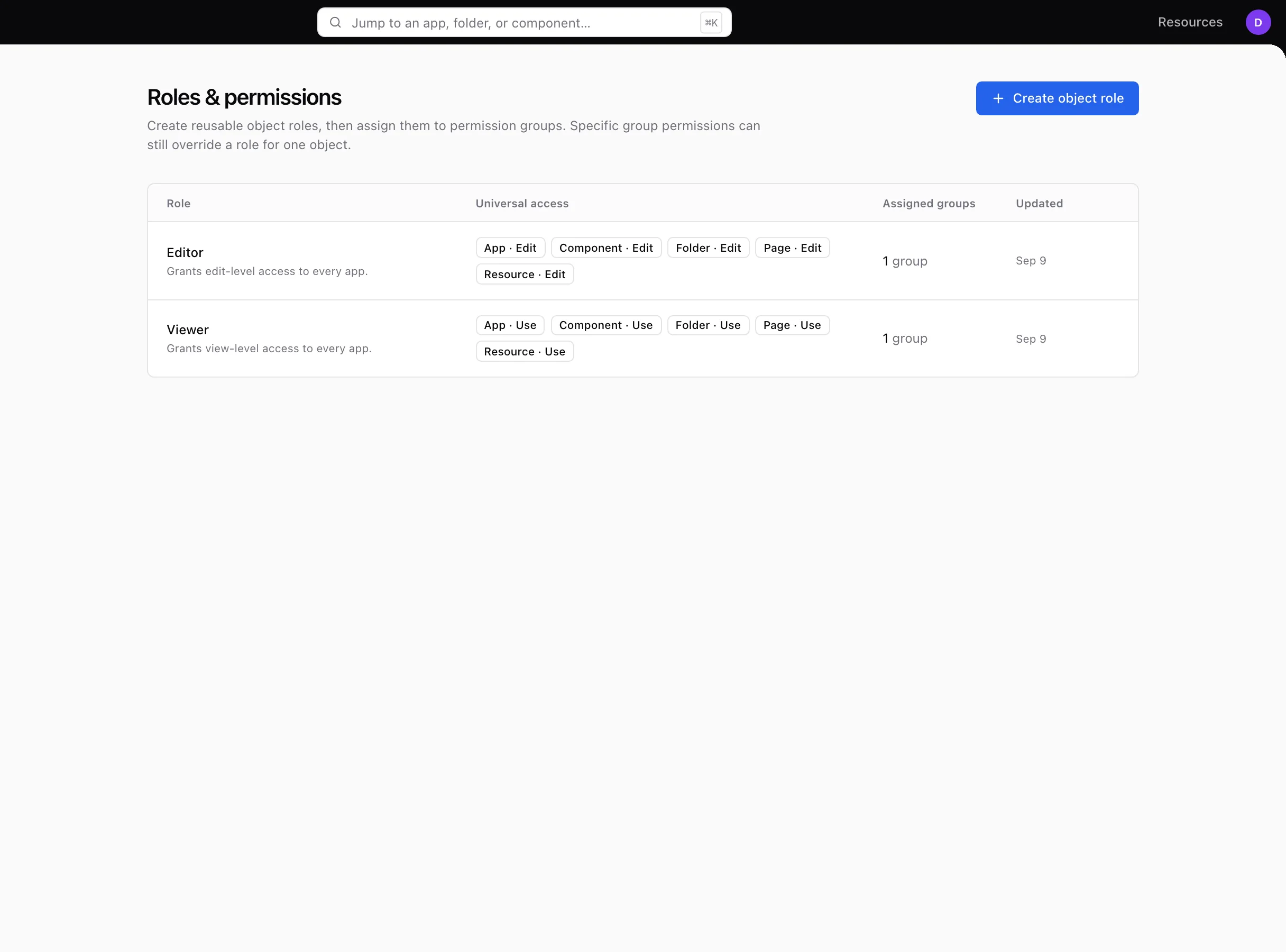
Access is additive across global roles, groups, object roles, and direct grants, with folder inheritance. Every protected operation is authorized in the backend, so a hidden button is never the security boundary.
Use, edit, own
On apps, pages, folders, reusable components, and resources. Administration controls for users, environments, and configuration.
SSO and invitations
Password, Google, and GitHub sign-in. Sessions end the moment an account is disabled.
Audit and observability
Identity-sensitive changes are recorded. Liveness, readiness, and runtime metrics are exposed for your monitoring.
Embedding with allowlists
Embed apps where your team works, restricted to the origins you approve.
Run it in your cloud, or let us run it for you.
Partials is three services: a Go API, a React client, and a Node runtime that executes server-side code in isolated workers. Deploy them as one image or separately.
Self-hosted
Docker Compose for a single machine, Helm charts for Kubernetes. MySQL as the only dependency.
Hosted by Partials
We run it, you use it. Same product, same code ownership, same permissions.
Your infrastructure, your keys
Resource credentials, configuration secrets, and model provider keys never leave your deployment.